That was it. Thanks! 
[quote=“Tow”]
I also ran into the same bug as dikamilo, however it’s unfortunately not reproducible. As it happened only once, I’m only 90% sure these were the steps leading to it:
- I started a map with Castle on Impossible
- Random resource given was gold (1000 I think)
- I went in the town to recruit Pikemen (I think from Guardhouse, not Castle, but I’m not sure)
- I pressed on “Maximum” and then “Recruit” and then I got a crash
“Stupid” me, I forgot to save the log file or make a screenshot, but I rushed to try to reproduce it by restarting VCMI. But I wasn’t “lucky” anymore. Same map, same random resource start (until I got gold again), but no way to reproduce it. I’ll keep trying to reproduce it while doing other tests, but so far about 10 attempts failed.
Now, in regards to majaczek’s post, I would like to detail a bit what still needs to be improved in the Recruit screen:
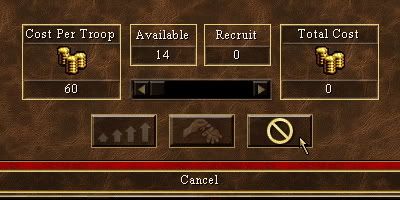
http://i4.photobucket.com/albums/y104/Zamolxis/VCMI/VCMI%2007/090205-H3CMaximumRecruitCancel.jpg [size=75](Heroes 3 Complete capture)[/size]
#12 - Scroll bar functionality:
Should be disabled when no creatures available to recruit (regardless of player’s resources)
Should be disabled when not enough resources for at least 1 creature (gold or even special res. for high level creatures) - even if there are creatures available for recruiting
And just to confirmed it’s still hanging to the mouse cursor (as reported above by Steven, or earlier in 0.6x by me)
#13 - Maximum button:
Should be disabled when no creature available to recruit
Should be disabled when player does not have enough resources to buy at least 1 creature
When hovering the mouse over the enabled button, info text “Maximum” should be displayed in the bottom bar of the Recruit window (so no info text when the button is disabled)
#14 - Recruit button:
Should be initially disabled, when we open the Recruit window.
It should become available once we select at least 1 creature to recruit (by scroll bar or Maximum button).
If we move the scroll bar back to the extreme left, it should get disabled again.
(Basically it should be disabled at all times when the amount of creatures in “Recruit box” is “0”)
When hovering the mouse over the enabled button, info text “Recruit” should be displayed in the bottom bar of the Recruit window (so no info text when the button is disabled)
#15 - Cancel button:
When hovering the mouse over the button, info text “Cancel” should be displayed in the bottom bar of the Recruit window (as in the screen capture above). Cancel button should be always enabled, so no need of hiding info text in case of disabled button.