I tried to see if anything can be done when battle freezes like this. Clicking on any creature or pressing hotkeys didn’t help. I tried to push all command buttons at the bottom and nothing happened except for one of them: the “Combat Options”. When I click on it, I’m getting a crash:
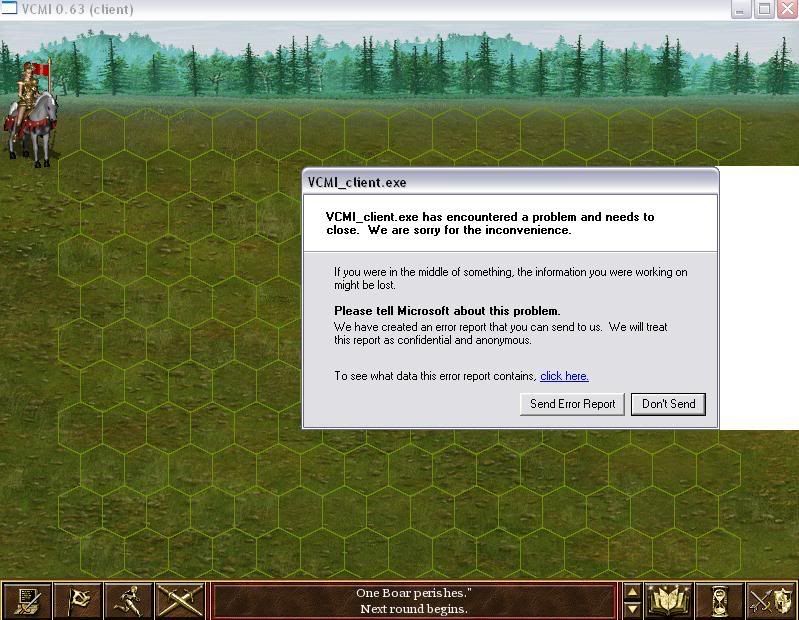
Probably this will be fixed once the bug creating the freeze is fixed, but anyway, I’m happy I ran into it, because it crossed my mind to test what happens if we click on it during a battle before the freeze.
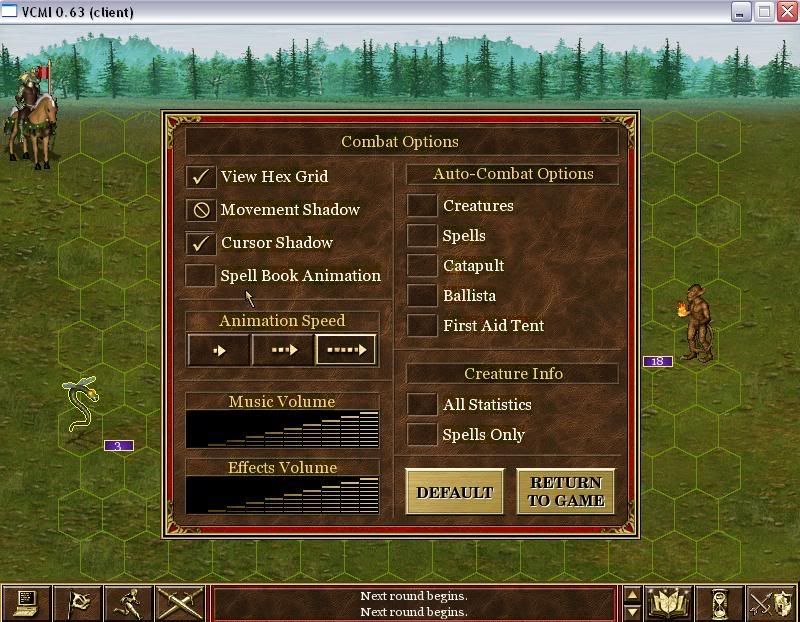
So I loaded another map, and opened the Combat Options window during the first battle (somehow I missed the fact this was introduced so I didn’t think of testing it before):
[color=orange]FUNCTIONALITY ISSUE[/color]
The Animation Speed should only have an impact on the - let’s call it - “active” animations: moving across the battlefield, attacks etc. Right now it also changes the speed of the “passive” animations, meaning the animation of the creatures who are just sitting there, waiting for their turn, unaffected by any kind of attacks. The result is quite obvious for example if we set the Animation Speed on Fast and we have a flying creature in our army. I almost started laughing when I saw how fast the Serpent Fly in my screenshot above was beating the wings, like they were desperate or something. 
[color=green]NICE NEW FUNCTIONALITY[/color] 
When we enable/disable the View Hex Grid & Movement Shadow options, we can actually see in the background how that affects the battle interface. This was not in the original game, but I actually find it very cool (if I may use that word:p). I’m not sure what are your plans about it, but my advise is to leave it like this. It does not affect the gameplay in anyway so I doubt anyone will complain about it being different from the original game. On the contrary, we can say this is sth that was missing there, so my guess is that everybody will welcome this. Great add! 
