Thanks for the above. Meanwhile I also noticed there are cases where my formula does not apply anymore, so most probably you guys are already closer to the real one. So I’m gonna drop the pathway testing for now, and only check it again in the next release.
I don’t know why I didn’t specifically notice this before, but I saw only now why the map keeps scrolling till the end of the frame whenever I go with my mouse out of the client screen. As seen in the screenshots below, the cursor arrow remains on the edge of the frame surrounding the Adventure Map, in the place where our mouse left the VCMI client interface. With the cursor stuck there, of course the map keeps scrolling from whatever place on the map to the frame.
Probably you’re already working on a fix as you mention. But I thought also of alternative, in case you want to keep the high sensitivity of the scrolling, but still allow us to exit the client without loosing focus of the area we want to make a screenshot of:
Suggestion: You could implement a “safe corner” - a corner of the client interface where we could safely place our mouse cursor, without causing the adventure map to scroll; and consequently to be able to leave the interface with our mouse, going to the application we use for screen captures. And perhaps the ideal corner for that is the upper right corner:

I guess nobody goes there for map scrolling, so we could safely have a small area of 5-10 mm starting from the corner, on both horizontal & vertical (or 10-15 mm on only one of them) which we could use to exit the map with our mouse, w/o causing the map to scroll at all.
And now the main thing I wanted to actually report:
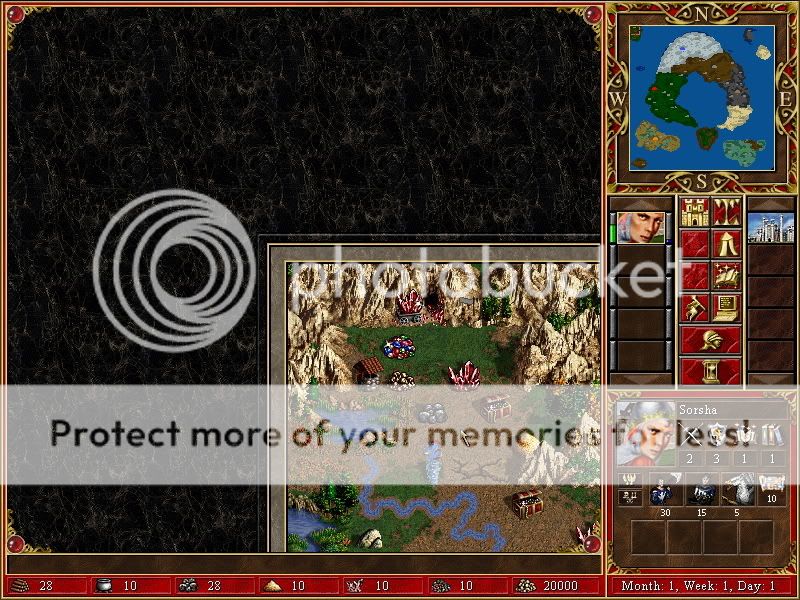
15 - The Adventure map frame does not correspond in size with the H3 frame in the left, right and bottom sides.
Here is the H3C frame:
We can see that on both vertical and horizontal, the frame takes maximum 45% of the space. So we can see quite a decent part of the map. And this applies symmetrically for all the sides of the frame: up, down, left, right (all same width).
In VCMI however, only the upper part of the frame seems correct. The left part is too big, while the right and bottom parts are too small:
http://i4.photobucket.com/albums/y104/Zamolxis/VCMI/081019-Frameupleft.jpghttp://i4.photobucket.com/albums/y104/Zamolxis/VCMI/081019-Frameupright.jpg
http://i4.photobucket.com/albums/y104/Zamolxis/VCMI/081019-Framedownleft.jpghttp://i4.photobucket.com/albums/y104/Zamolxis/VCMI/081019-Framedownright.jpg
